

⚡ Instant Digital Delivery | 💬 WhatsApp Support | 🔒 Secure Payments


Smart template matching
Select your photos and see PSD layouts that match their exact horizontal and vertical photo count.
⚡ Instant Digital Delivery | 💬 WhatsApp Support | 🔒 Secure Payments
FOR PHOTOGRAPHERS & ALBUM DESIGNERS
Your photos.
A smarter album workflow.
Match the right PSD. Build your pages. Finish in Photoshop. An album design workspace built around the way your studio works.
 CineQ Album ProWINDOWS · 64-BIT
 CINEQ ALBUM PRO
LAUNCHING SOON
17 October 2026 · 12:00 AM IST
1 Year licence from activation
Get it for ₹999
11–17 October 2026, inclusive · IST
Pre-booking is not an instant download. Software delivery and activation begin with the final launch on 17 October 2026.
Bookings open. CINEQ999 begins.
Software delivery & activation begin.
₹1,499.50 after the coupon ends.
THE ACTUAL SOFTWARE
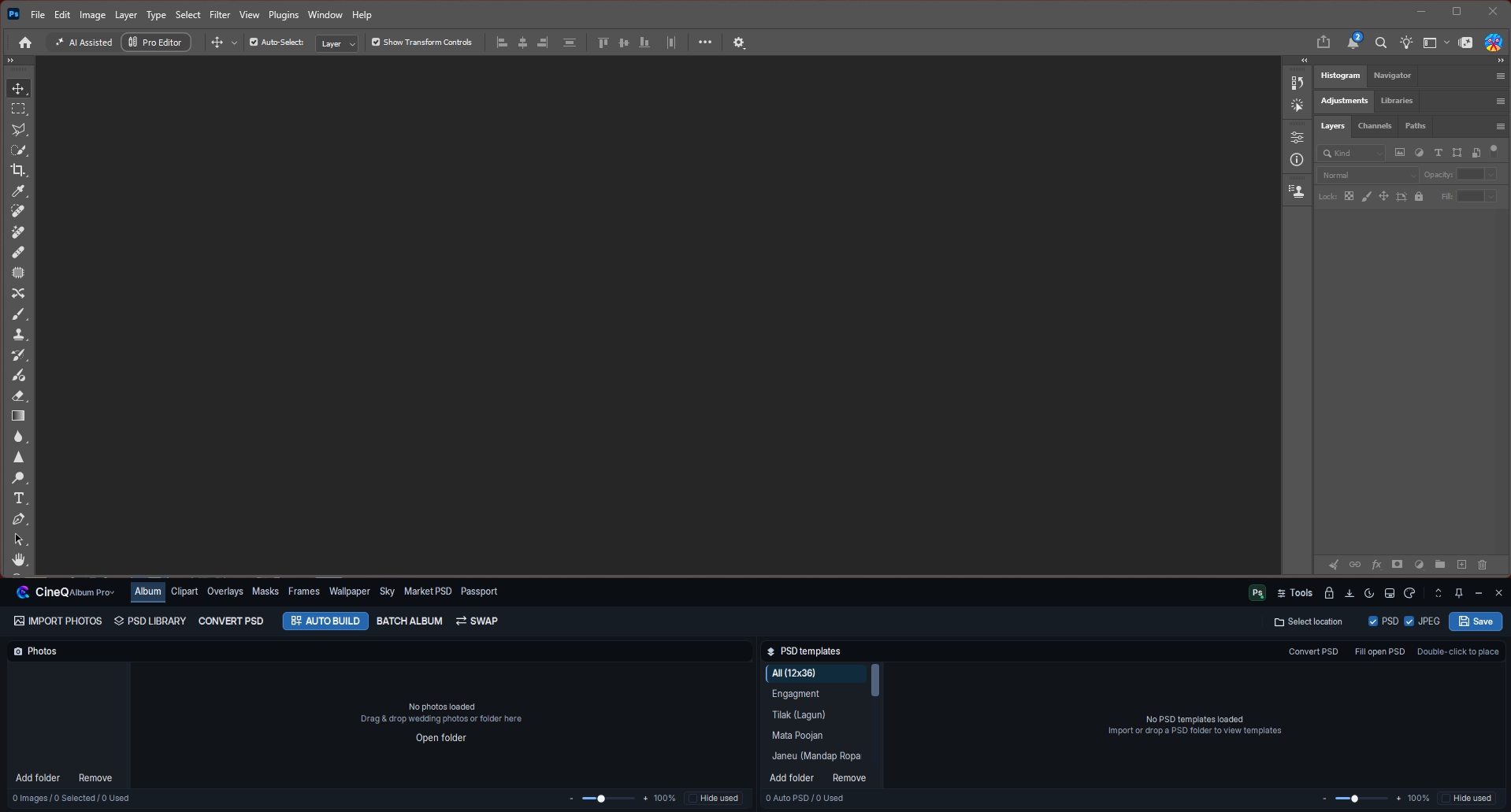
Your Photoshop workspace, with CineQ’s album tools close at hand. Real screenshots of the current interface.

LESS REPETITION. MORE CREATION.
Select your photos and see PSD layouts that match their exact horizontal and vertical photo count.
Build album pages from your selected photographs and matching PSD templates.
Bring multiple album pages together with a dedicated batch album workflow.
Place photos into Photoshop documents, fill an opened PSD and continue your finishing work in Photoshop.
Browse your template library, organise your photo selection and swap photographs while designing.
Create, save and reopen album projects, then manage your album output from one workspace.
YOUR STUDIO. YOUR TEMPLATES. YOUR FINISH.
BUILD YOUR STUDIO SETUP
A practical setup guide for CineQ Album Pro and Photoshop working together. Your installed Photoshop version may require a newer CPU, GPU or Windows version.
For basic 12×18 and 12×36 single-sheet designing.
For large 300 DPI PSDs and batch album workflows.
The connection engine detects registered Photoshop versions and prioritises newer installations. Detection support does not guarantee every workflow on every version.
Using an older release? Contact CineQ Pro to check your exact Photoshop version and workflow before booking. 32-bit Windows and Windows 7/8 are outside this release’s target setup.
A 12×36 inch sheet at 300 DPI is 10,800 × 3,600 pixels. More layers and smart objects increase memory use; 16–32 GB gives your studio more headroom.
Store active templates and working files on an SSD. Keep space available for Photoshop’s scratch disk, especially during batch exports.
The current Windows x64 installer payload includes the .NET 8 desktop runtime. No separate runtime installation is needed for that self-contained package.
For the requirements of your Photoshop release, see Adobe’s official system requirements ↗.
BEFORE YOU BOOK
A 1 Year CineQ Album Pro software licence, valid from activation. The ₹999 coupon applies to this software product only and cannot be combined with other coupons. A compatible installed copy of Adobe Photoshop is required and is not included.
Bookings open on 11 October 2026. Final software launch is 17 October 2026; delivery and activation begin then. CINEQ999 is valid for seven calendar days, 11–17 October inclusive, in Indian Standard Time.
A Windows 64-bit computer and a compatible installed copy of Adobe Photoshop. Use the minimum and recommended setup guide above. Internet is required for activation and periodic licence verification.
From 11–17 October, add CineQ Album Pro to your cart and enter CINEQ999 at checkout. It reduces the ₹1,499.50 software price by ₹500.50 to ₹999. From 18 October the coupon expires, while the 50% offer price remains ₹1,499.50.
Have a question before you book?
Talk to CineQ Pro
Sign in with your CineQ Pro account to open your Album Flipbook dashboard and manage private projects.
Sign in to continue to your Album Flipbook dashboard.
WhatsApp SupportNeed help? Chat with us Create New Account